Art of Advertising is a Leadinfo Gold Partner. We set up visitor recognition for B2B companies and connect it to their CRM. This article explains how it works, what it can and cannot do, what the GDPR says and how to make sure sales actually uses it.
Can you see which companies visit your website?
Yes, for part of your visitors. Web analytics such as Google Analytics shows sessions, sources and page views, but no organisations. Company recognition fills that gap: you see which company came in, which pages it viewed, for how long and how often it returned.
A company name on its own says little. What matters is which of those companies are considering a purchase right now and who gets in touch with them. That is what the rest of this article is about.
How do you identify website visitors?
Every visit to your website arrives through an IP address. IP recognition uses that address to find the organisation behind the network. It takes four steps.
- The visit. Someone opens your site from the office or through their employer's VPN. The IP address then belongs to the company network.
- The match. The tool looks up which organisation that IP address belongs to. Leadinfo uses a database of IP addresses linked to companies.
- The filter. If the address belongs to an internet provider or a data centre, the visit drops out. If it belongs to a company, sector, size and location are added.
- The follow-up. If the company fits your ideal customer profile and viewed the right pages, the account manager gets an alert.
The tool handles the first three steps. The fourth is work for you and your sales team, and it decides whether conversations follow.
What identifying website visitors can and cannot do
Company recognition is often sold as bigger than it is. This is what you can realistically expect.
| Can do | Cannot do |
|---|---|
| Show which company visited your site through a business network | Show which person sat behind the screen |
| Show which pages the company viewed, for how long and how often | Recognise home workers without a VPN |
| Filter companies by sector, size and region | Recognise visitors on a mobile network |
| Send an alert when a matching company returns | Prove a company did not visit because it is missing from the list |
That last row matters. A company that is not in your overview may well have visited your site, for example from a home connection. Read the list as part of your traffic, not the whole of it.
Can someone see that you visit their website?
A website owner using company recognition sees the name of your organisation when you browse through the company network. They do not see your own name, because Leadinfo recognises companies and not people. If you work from home without a VPN or use your phone, the owner usually sees only an anonymous visit.
Is it legal to identify website visitors under the GDPR?
Identifying website visitors at company level is allowed if you set it up properly. In 2016 the Court of Justice of the EU ruled in the Breyer case (C-582/14) that an IP address can be personal data under certain conditions. So you need a legal basis under the GDPR.
Leadinfo bases the processing on legitimate interest (Article 6(1)(f) GDPR). You can also choose to ask for consent first through your cookie banner. You decide what fits your situation, ideally together with whoever handles privacy in your organisation.
We check these points with every setup:
- Your privacy statement mentions company recognition and the legal basis.
- There is a data processing agreement with the supplier.
- You store no personal data about who was on your site.
- Sales approaches companies with a business reason, not based on the behaviour of one person.
Does company recognition work when visitors reject cookies?
Company recognition through the IP address happens at network level and needs no cookie. Whether a company shows up therefore does not depend on the choice in your cookie banner, unless you choose consent as your legal basis. In that case you load the tracking only after a yes, and you see fewer companies.
What we saw: the list is the start, the agreement with sales is the work
Most explanations of how to identify website visitors stop at the list of company names. In our projects we saw that the list only pays off when you agree three things in advance. Which companies fit your customer profile, which pages signal buying interest, and who picks up the alert?
At Klimaatgroep Holland we identify business website traffic and segment it by sector. Each account manager knows which companies he can approach, instead of one long list for everyone. At Templari Benelux sales uses the same approach to contact companies that are researching heat pumps.
business website traffic segmented per sector, ready for the account manager
View the Klimaatgroep Holland project
At DBT-Energie company recognition is part of a wider setup with LinkedIn campaigns. There sales knows for each lead which campaign it came from, so the conversation starts with the right question.
sales knows for each lead which campaign it came from
How do you turn recognised companies into sales conversations?
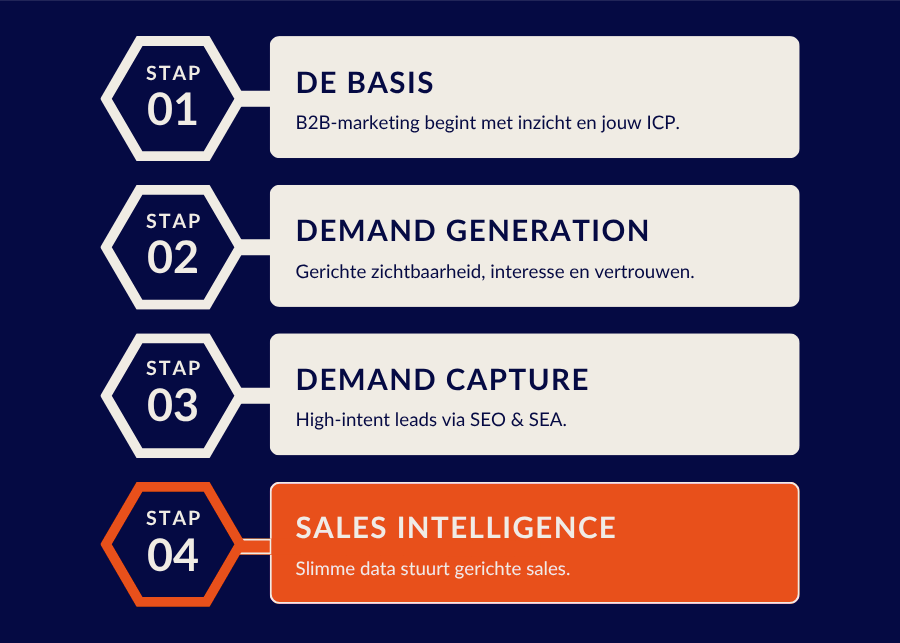
A company name is not a lead yet. So do not start with the tool, start with the agreement with sales. This is how we approach it, as the last step in our method for sales intelligence and lead scoring.
- Define your ideal customer profile. Sector, size and region decide whether a visit matters. Without that filter sales also gets competitors, applicants and suppliers.
- Pick the pages that signal buying interest. A pricing page, a case study or a specific service page says more than your vacancies or your blog.
- Agree who picks up what. A fixed account manager per sector, region or product group, and a time frame for responding.
- Connect it to your CRM. An alert in a mailbox gets lost. In HubSpot or Pipedrive sales sees the company history in one place.
- Report back what it produced. Which recognised companies became a conversation or a deal? That decides which campaigns you scale up.
Company recognition works best when you are already visible to the right companies. It captures the interest you built with demand generation and B2B lead generation, and makes sales intelligence a fixed step in your sales process.
What company recognition delivers
Identifying website visitors shows you which companies view your site. You don't see individuals, and home workers and mobile traffic largely drop out. Within those limits it is a useful signal, especially in B2B, where few visitors fill in a form. Whether it pays off depends on what you agree with sales in advance: which companies and pages count, and who picks it up.